🗂️ Filters
🔎 Where Can I Find the Filters?
In Whatsdash, all filtering options are available in one central place — the Filters panel.
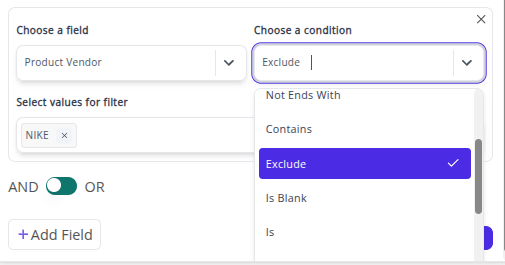
You can use this panel to refine your reports based on specific data conditions such as Contains, Not Contains, Is, Is Not, Greater Than, Lesser Than, and more.
⚙️ Filters Panel Overview
Filters Panel
All filtering options are located in the Filters panel of the reports.

To open the Filters panel, simply:
-
Go to any report in your workspace.
-
Click on the Filters icon located in the top-right of your report toolbar.
-
Choose the filter type you want (e.g., Contains, Is Not, Greater Than).
-
Apply the filter to instantly narrow down your report data.
📖 Table of Contents
### 🔍 Contains and Not Contains
Filter data that contains or does not contain specific text values.
Include or exclude exact matches for your chosen field.
Add or remove specific data groups to refine your report results.
### 🚫 Is Blank and Is Not Blank
Identify missing or populated fields in your dataset.
### 🏁 Begins With and Not Begins With
Filter records based on how values start.
### 🔚 Ends With and Not Ends With
Filter records based on how values end.
💡 Pro Tip
Use multiple filters together to create layered conditions — for example, filter by Product Type Contains “Shirt” and Inventory Greater Than 10
to instantly find best-selling items in stock.